Posts

Showing posts with the label weather

Microbit WiFi weather station
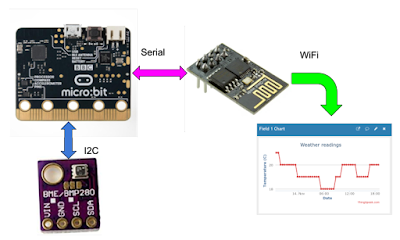
Image
Introduction  This is a microbit project aimed at junior schools. It allows you to:  make regular readings of things you can measure electronically (such as  air pressure  and  temperature ) upload  those readings automatically via WiFi to a free  web service  ( ThingSpeak ) where you can store readings, and display the readings as a chart, for example It features: low current consumption (typically 2.2 mA average) easy set-up of your readings at ThingSpeak easy assembly of the parts  It evolved from some of my previous projects: a  Microbit weather station  for example, which used a pair of microbits to upload readings to a laptop or similar.  I've used a few good articles on the web to get this project running (see the Further reading section). The design is really quite simple and easy to use. No human intervention is required to upload the readings, and a Real Time Clock isn't needed as ThingSpeak records the date & t...
Microbit radio weather station

Image
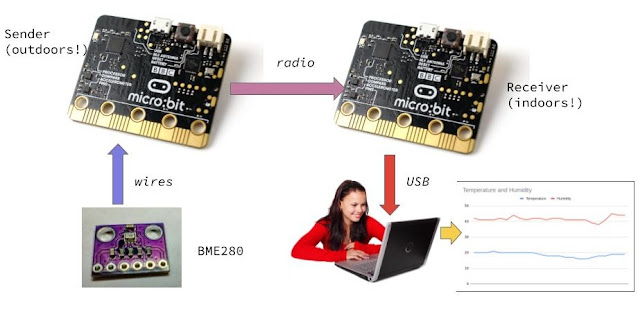
I've built a couple of microbit weather stations in the past; the last one used Bluetooth to upload readings to a laptop for further processing. This one is aimed at younger students and uses the microbit's built in radio , which is a bit easier to code. The sender microbit records weather readings every hour or so (your choice). To upload the readings, to make a daily chart or graph perhaps, we use a second receiver microbit to fetch the readings. They can then be sent via USB, or some other means, to a laptop or phone. So the sender can be untouched and in a fairly inaccessible place (depending on the radio range, of course). Powering the sender I didn't want to use non-rechargeable cells, so I tried a power bank . This is a high-capacity rechargeable battery which is normally used to supply energy to a phone. It has some clever circuitry which, among other things, disconnects the battery from its load when the load current has dropped. Power bank But - this particula...

Microbit weather station

Image
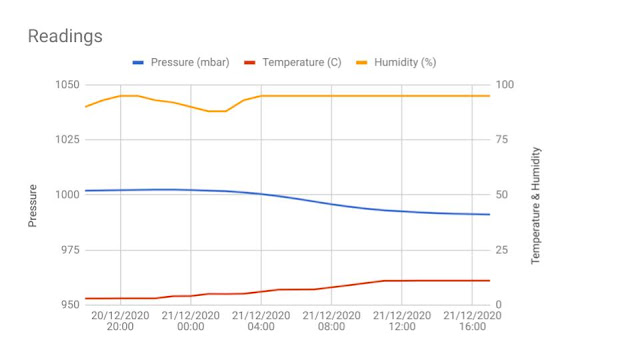
 Microbit V1 weather station Update: Feb 2021: I've published the microbit V2 version using Bluetooth (BLE) Update 7th Jan 2021 : I've found an error in my DS3231 extension, so now it is feasible to use the microbit's Bluetooth (BLE) - which means the second microbit won't be necessary. And I fixed my Google Apps Script code for the chart! This project lets you make regular hourly readings of weather measurements, store them, and upload them to a phone or computer. The date and time of each reading are also recorded. You can use the readings to plot a chart, for example, to show how the weather changed over time. Here's a set of readings over 24 hours: These are the measurements I am using for this project: Barometric air pressure Temperature Humidity You can add more "instruments" - for example, I plan to add a home-made rain gauge, as described in this blog. The weather station can be self-contained, powered from a couple of batteries perhaps. You can...

Using weather forecast data

Image
 Using weather forecast data Compare your readings with a forecast Having built a microbit-based weather station , I was keen to see how its readings compared with forecasts (in my case I used Met Office data). I quickly got bored with downloading the forecast manually, so here's a way of doing it with a Google spreadsheet and some GAS (Google Apps Script - which is really JavaScript plus some handy libraries). Here are some example charts: Accessing Met Office forecasts The first thing is to get yourself access to the Met Office forecasts, at Met Office DataPoint . Here you can register and get your own API Key - a kind of password that will be used in the URL you use to fetch the forecast data. Google Apps Script Now you can create your spreadsheet and script. If this is new to you, try this article . I'll describe my own script below. The entire code is written as one function: getTH(). It starts like this:

Microbit (V2) weather station

Image
  Microbit weather station mk2 This project builds on my experience ( here ) with a microbit. This version uses Bluetooth Low Energy (BLE) to upload readings to a device, such as a phone - this is a much more convenient upload method than USB. I have also had reliability problems with the DHT11 temperature and humidity sensor. It seems this isn't uncommon! So I am using the BME280 device to measure all 3 parameters: air pressure, temperature and humidity. This device has rather good accuracy: ±1.25℃ (temperature), ±3% (humidity), and ± 1 mbar (pressure). ❗At the moment the MakeCode extension for the BME280 only returns integers for the readings. The author is planning to update it so please check back here for blog updates! The weather station lets you make regular hourly readings of weather measurements, store them together with the date and time, and upload them to a device. You can use the readings to plot a chart, for example, to show how the weather changed over time. Here...